Layers
Layers
Layers group objects for display, for plotting, and for exchange with other CAD programs through DXF.
The current layer
New geometry is created on the current layer, shown in the dropdown at the right-hand end of the ribbon. Change it there before you draw, or change an object's layer afterwards in Properties.
The dropdown lists every layer present in the drawing.
Layer Manager
Command: LAYER, LA
Layers group objects for display and DXF. New geometry uses the current layer from the ribbon (top right). Layer 0 cannot be renamed or deleted.
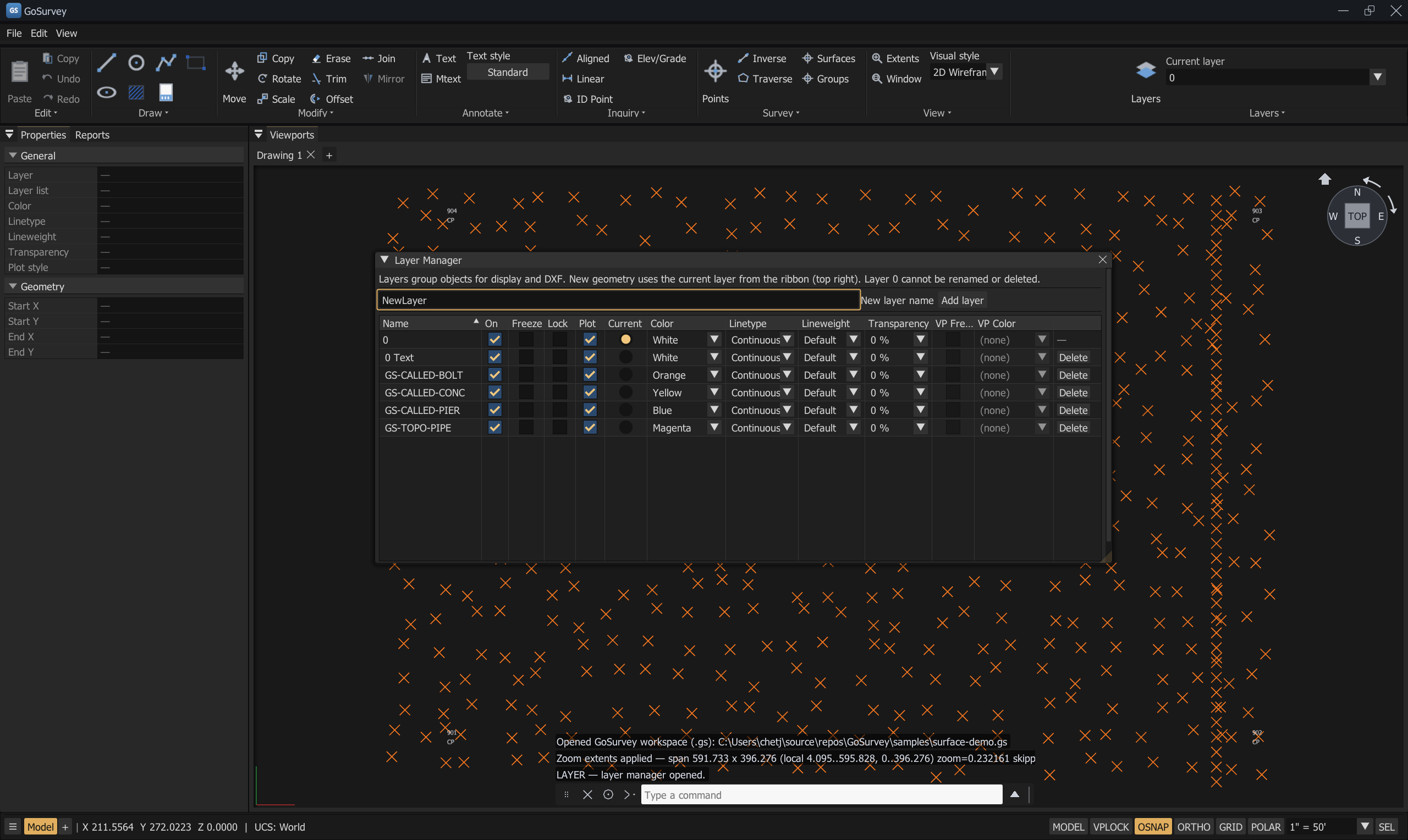
The Layer Manager. VP Freeze and VP Color are greyed out here because this is model space — they act on the current viewport in a paper layout.
Creating a layer
Type a name in New layer name and press Add layer. The log confirms Layer added: <name>,
or reports why it was refused.
The table
| Column | What it does |
|---|---|
| Name | The layer name. Editable, except for layer 0 |
| On | Stored, not yet applied — see the note below |
| Freeze | Stored, not yet applied |
| Lock | Stored, not yet applied |
| Plot | Working. When off, this layer's geometry — and any viewports on it — is excluded from plots |
| Current | Makes this the current layer for new geometry |
| Color | Layer colour, used by entities set to ByLayer |
| Linetype | Layer linetype, used by entities set to ByLayer |
| Lineweight | Layer lineweight, used by entities set to ByLayer |
| Transparency | Layer transparency, used by entities set to defaults |
| VP Freeze | Freezes this layer in the current viewport only |
| VP Color | Overrides this layer's colour in the current viewport only |
| (last column) | Delete the layer |
The Name column and the header row stay put while you scroll.
On, Freeze, and Lock are recorded but not yet enforced. The dialog says so: "On / Freeze / Lock are stored for future visibility and editing rules; all layers still draw." They round-trip through the drawing file and DXF, so setting them is not wasted — they just do not change what you see yet. To hide objects today, use
ISOLATEOBJECTS/HIDEOBJECTS(Object Selection) or per-viewport VP Freeze.
Colour, linetype, lineweight, transparency
Colour, linetype, lineweight, and transparency apply to entities set to ByLayer / defaults.
An object with an explicit colour keeps it. An object set to ByLayer follows its layer. Set an object back to ByLayer in the Properties panel to hand control back to the layer.
Linetypes come from the bundled acad.lin and acadiso.lin libraries — CONTINUOUS, BORDER,
CENTER, DASHED, DASHDOT, DIVIDE, DOT, HIDDEN, PHANTOM, their 2 and X2 variants,
the ACAD_ISO*W100 family, and pattern linetypes such as FENCELINE1.
Rules
- Layer
0cannot be renamed or deleted. - Renaming succeeds with
Layer renamed.in the log; a rejected rename says why. - The layer table is synchronised with the geometry every time the dialog is drawn, so a layer referenced by an object always appears.
Per-viewport layer control
In a paper-space layout, a layer can be frozen or recoloured in one viewport without affecting the others or the model.
From the Layer Manager
The VP Freeze and VP Color columns act on the current viewport. In model space, or when no single viewport is current, both columns are disabled.
From the drawing
| Command | Aliases | What it does |
|---|---|---|
VPFREEZE |
VPF |
Freezes the picked entities' layers in the current viewport |
VPTHAW |
VPT |
Thaws the picked entities' layers in the current viewport |
Run the command, then pick objects. Every layer you touch is frozen or thawed in that viewport. This is the fast way to say "not this, not in this view" without hunting through the layer table.
Layers and file exchange
- DXF export writes a full
LAYERtable with plot-style pointers, ACI colours, and lineweights. Objects carry their layer. - DXF import creates the layers the file defines.
- Survey points carry a per-point layer, set in the Create Points panel or the Viewpoints table, and exported as the POINT entity's layer.
See Import and Export.
Common problems
| Problem | Cause | Solution |
|---|---|---|
| Turning a layer On off changes nothing | On/Freeze/Lock are not enforced yet | Use HIDEOBJECTS / ISOLATEOBJECTS, or VP Freeze in a layout |
| Changing a layer's colour does not change an object | The object has an explicit colour, not ByLayer | Select it and set Color to ByLayer in Properties |
| A layer will not plot | Its Plot flag is off | Tick Plot in the Layer Manager |
| The sheet border is missing from a plot | The border layer is not plottable | (border omitted from plots if layer not plottable) — tick Plot for that layer |
| VP Freeze is greyed out | You are in model space, or no single viewport is current | Switch to a layout and make one viewport current |
Related
Properties · Object Selection · Paper Space and Layouts · Import and Export